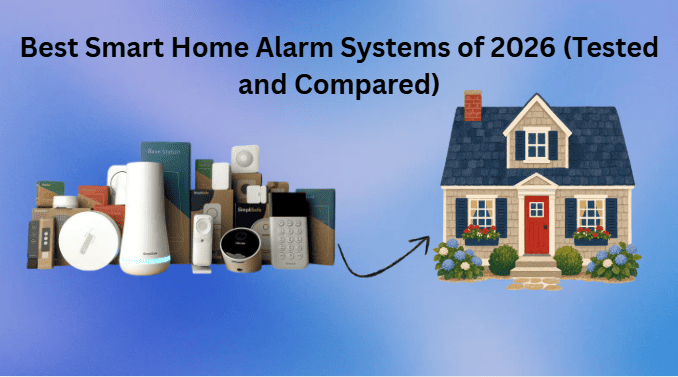
The best smart home alarm system for most households is SimpliSafe, particularly for buyers who want flexible equipment, straightforward DIY installation, and the option of professional monitoring. Ring Alarm is worth considering for homes that already use Alexa or Ring cameras, while ADT and Vivint appeal to buyers who prefer professional installation or a more integrated security service. Abode is another option for people who prioritize smart home compatibility.
The right system depends on your home’s layout, budget, existing smart devices, and preferred monitoring method. Some systems focus on affordable wireless equipment, while others offer professional setup, connected cameras, and advanced home automation.This guide compares five home security systems available in the US market, explaining their main features, advantages, limitations, and costs to consider before buying. The recommendations are based on product information and published research rather than first-hand testing by the author.
Best Smart Home Alarm Systems: Quick Comparison
| Security system | Best for | Installation | Monitoring options |
| SimpliSafe | Flexible home security | DIY and professional options, depending on availability | Self-monitoring and eligible paid plans |
| Ring Alarm | Alexa and Ring households | DIY | Self-monitoring and eligible paid plans |
| ADT | Professionally managed security | Depends on the package | Professional monitoring options |
| Vivint | Integrated smart home automation | Professional | Professionally monitored service |
| Abode | Smart home integration | Primarily DIY | Basic features and eligible paid plans |
Equipment bundles, subscription requirements, installation services, and prices vary. Check the current terms directly with each provider before making a purchase.
SimpliSafe: Best Smart Home Alarm System for Most Households
SimpliSafe is a strong choice for homeowners and renters who want a straightforward security system without an unnecessarily complicated installation process. Its equipment lineup includes a base station, keypad, entry sensors, motion sensors, and compatible cameras and accessories.The system allows buyers to select equipment according to their home’s needs and choose between available monitoring options. This flexibility makes it a practical starting point for people who want to build a security setup gradually.
Key Features of SimpliSafe
- Flexible installation: Set up compatible equipment yourself or check whether professional installation is available in your area.
- Expandable protection: Add compatible entry sensors, motion detectors, and cameras as your requirements change.
- Monitoring choices: Compare basic self-monitoring features with paid plans that provide professional monitoring and additional services.
- Connected security: Use compatible cameras and accessories to extend protection beyond entry sensors.
- Smart home compatibility: Check the current supported integrations if you want to connect your alarm system with a voice assistant or other smart devices.
Advantages and Limitations
SimpliSafe’s main advantage is its balance of equipment flexibility and accessible installation. It can suit people who want to monitor their property themselves while retaining the option of professional monitoring.However, the total cost can increase when you add cameras, extra sensors, or subscription-dependent features. Its automation capabilities may also be less extensive than those of systems designed for more comprehensive smart home integration.
Best for: Households looking for a flexible alarm system with straightforward setup and optional professional monitoring.
Official website: https://simplisafe.com/
Ring Alarm: Best for Alexa and Ring Households
Ring Alarm is a logical choice for households that already use Amazon Alexa, Ring video doorbells, or Ring security cameras. It brings compatible alarm equipment into the broader Ring ecosystem, allowing users to manage supported devices through compatible apps and connected services.The system is designed for DIY installation, making it appealing to renters and homeowners who prefer to install their own security equipment.
Key Features of Ring Alarm
- Alexa integration: Connect supported Ring equipment with Alexa for compatible voice controls and smart home routines.
- Camera compatibility: Use supported Ring cameras and doorbells alongside your alarm system.
- Expandable equipment: Add compatible contact sensors, motion detectors, and other accessories.
- App-based management: Check supported system functions and receive alerts through the relevant mobile app.
- Flexible setup: Start with an appropriate alarm kit and expand your equipment as your security needs change.
Advantages and Limitations
Ring Alarm is particularly convenient if your household already owns compatible Ring devices. Keeping supported security products within one ecosystem can make everyday management easier.The main limitation is that some features require a subscription or specific equipment. Video storage, cellular backup, remote access, and professional monitoring may have different requirements depending on the selected plan and product.Privacy is another important consideration. Review the available account security settings, video storage options, sharing permissions, and privacy policies before installing cameras.
Best for: Alexa users and households that already use Ring cameras or video doorbells.
ADT: Best for Professionally Managed Home Security
ADT is worth considering if you prefer professional assistance and a security service that includes monitoring options. Depending on the package, its systems can combine entry sensors, motion detectors, cameras, environmental sensors, and compatible smart home devices.This approach may be particularly useful for people who want help choosing equipment, arranging sensor placement, and setting up a more comprehensive security system. An honest review of Ring Alarm, exploring its features, pricing, security, and overall value for home protection.
Key Features of ADT
- Installation options: Professional installation or other available setup options depend on the selected package.
- Professional monitoring: Eligible services connect alarm signals to a monitoring center that follows established response procedures.
- Multiple security devices: Available configurations may include entry sensors, motion detectors, cameras, and environmental sensors.
- Smart home features: Check the supported integrations and connected-device functions for your specific system.
- Service assistance: Professional setup and ongoing support may benefit households with larger properties or more complicated requirements.
Advantages and Limitations
ADT may suit buyers who value professional assistance and a managed security service rather than handling every aspect themselves.However, installation, monitoring, equipment financing, and contractual commitments can make some packages more expensive than basic DIY alternatives.Before signing an agreement, request an itemized quote covering equipment, installation, monthly monitoring, activation charges, financing costs, and cancellation terms. Also confirm whether you own the equipment and what happens if you move.
Vivint: Best for Advanced Smart Home Automation
Vivint is designed for households that want home security and automation to work together. Depending on the installed equipment, its systems can integrate security sensors, cameras, smart locks, lighting controls, and thermostats through a connected platform.Unlike a basic wireless alarm kit, Vivint typically involves professional installation and a more involved service relationship. It may therefore appeal to homeowners who want a coordinated setup rather than the lowest possible initial cost.
Key Features of Vivint
- Integrated controls: Manage supported security and smart home devices through compatible controls and apps.
- Automation routines: Configure supported devices to perform actions based on schedules or security events.
- Camera integration: Add compatible cameras to monitor suitable entry points and other areas.
- Professional setup: Get assistance with equipment placement, configuration, and integration.
- Expandable protection: Discuss additional sensors and connected devices when selecting your system.
Advantages and Limitations
Vivint’s main attraction is the ability to combine security and compatible home automation equipment within one system. This can be useful for people who want to manage several connected devices together.The disadvantages include potentially higher initial costs, professional installation requirements, and ongoing service expenses. Equipment financing and contract conditions can also affect the total cost.Before committing, request a written quote and confirm which features are included in the package. If you only need a keypad, door sensors, and basic alerts, a simpler system may offer better value.
Best for: Homeowners who want professionally configured security and compatible smart home automation.
Abode: Best for Flexible Smart Home Integration
Abode is a useful option for people who want a wireless security system that can work with compatible smart home devices. Depending on the equipment and configuration, its ecosystem supports selected integrations with platforms such as Apple Home, Alexa, and Google Home.It may appeal to smart home enthusiasts who want to coordinate security sensors, lighting, locks, and other compatible devices without necessarily choosing a fully managed security service.
Key Features of Abode
- Smart home compatibility: Check support for your existing devices before choosing a hub or starter kit.
- DIY installation: Many of its security kits are designed for self-installation.
- Expandable equipment: Add compatible sensors and accessories as your requirements grow.
- Monitoring flexibility: Compare the features available without a subscription with those included in paid plans.
- Automation options: Use supported integrations to coordinate compatible devices and selected security events.
Advantages and Limitations
Abode’s flexibility makes it worth considering if you already have connected devices and want more control over how they work together.However, compatibility varies by device, hub, subscription, and configuration. Not every product supports every integration, so check the manufacturer’s current compatibility information before purchasing.You should also confirm which features remain available if you cancel a paid plan. Basic alarm functions, remote access, automation, and professional monitoring may have different requirements.
Best for: Smart home enthusiasts who want flexible device integration and a choice of monitoring options.
How Much Does a Smart Home Alarm System Cost?
The cost of a home alarm system includes more than the initial equipment package. Depending on your setup, you may also pay for additional sensors, cameras, installation, video storage, professional monitoring, and backup connectivity.
Consider the following expenses when comparing systems.
| Cost category | What to consider |
| Starter equipment | Base station, keypad, and included sensors |
| Additional sensors | Extra doors, windows, garages, and other entry points |
| Cameras | Indoor, outdoor, and doorbell cameras, plus any storage subscription |
| Installation | DIY setup or a professional installation fee |
| Monitoring | Self-monitoring features or a paid professional service |
| Backup connectivity | Cellular backup, if supported and included in your plan |
| Power backup | Battery backup for the base station and compatible equipment |
| Contract costs | Financing, activation fees, cancellation charges, and minimum service terms |
Prices and promotions change frequently, so compare current offers directly with each provider rather than relying on an old price list.
Is Professional Monitoring Worth the Cost?
Professional monitoring can be useful if you want a monitoring center to receive qualifying alarm signals and follow its response procedures when an alarm is triggered.Depending on the service and event, the monitoring center may attempt to contact you or request emergency assistance. Exact procedures vary by provider, plan, and location.Self-monitoring may be suitable if you are comfortable responding to notifications yourself. However, mobile alerts are not a guarantee that you will notice an alarm immediately, particularly if your phone is offline, muted, or out of reach.Before paying for monitoring, check whether the plan includes cellular backup, battery backup, video verification, environmental alerts, and the response services you need.
How to Choose the Best Home Alarm System
The right security system should protect your home’s entry points, work reliably with your devices, and fit your budget without requiring unnecessary features.
Choose Between DIY and Professional Installation
DIY installation can be a good option for renters and budget-conscious households. Many wireless systems use adhesive-mounted or screw-mounted sensors, reducing the need for extensive wiring.Professional installation may be preferable for larger properties, complicated layouts, or systems that include multiple cameras and automation devices.
Check the Sensors Included in the Kit
Start by identifying the exterior doors and accessible windows that need protection. Entry sensors can detect when a protected door or window opens, while motion sensors can monitor suitable indoor areas.Consider additional compatible sensors if you need protection against smoke, carbon monoxide, water leaks, or freezing conditions.A security system’s sensor or listener is not necessarily a substitute for a dedicated, properly installed smoke or carbon monoxide alarm. Keep appropriate life-safety alarms installed and maintained according to their manufacturers’ instructions.
Check Wireless Reliability and Backup Power
Wireless sensors simplify installation, but the base station still needs reliable power and a working communication path.Look for a system with battery backup. Cellular backup can also help maintain communication if your home internet connection fails, provided the system supports it and the service is active.Confirm which backup features are included in the equipment and which require a subscription. Do not assume every system will continue sending remote alerts during an internet or power outage.
Confirm Smart Home Compatibility
If your household uses Alexa, Google Home, Apple Home, connected locks, or smart lighting, check the exact compatibility of the system you intend to purchase.Integration can range from basic voice commands to device status announcements and automation routines. The available functions vary by manufacturer, hardware, software, and subscription.Do not assume every alarm system supports voice arming or disarming. Some commands may be restricted for security reasons.
Review Privacy and Account Security
Connected security systems may collect alarm events, device status information, account details, and video recordings.Review the provider’s privacy policy and check how recordings are stored, shared, retained, and deleted. Use a strong, unique password and enable multifactor authentication if available.Limit account access to trusted household members, install software updates, and position cameras to respect the privacy of neighbors and visitors.
Compare the Full Cost Over Time
Compare the initial equipment cost with installation and subscription expenses over at least the first year.Include extra sensors, monitoring, camera storage, backup connectivity, financing charges, and potential cancellation fees.A low-priced starter kit may become more expensive once you add the features you need. A system with fewer recurring costs may offer better value if it still provides adequate protection and the required integrations.
How We Evaluated These Home Alarm Systems?
This comparison uses manufacturer product information, published specifications, and independent home security reviews. The five systems were assessed according to their installation options, monitoring flexibility, smart home compatibility, equipment choices, privacy considerations, and potential ongoing costs.The recommendations are research-based. The author has not independently tested these systems for this article, so the rankings should not be interpreted as results from hands-on laboratory testing.Product features, service availability, prices, and subscription requirements may change. Readers should confirm current information directly with each provider before purchasing.
Frequently Asked Questions
What Is the Best Smart Home Alarm System in 2026?
SimpliSafe is a strong all-around option for households that want flexible equipment and a choice of monitoring options. Ring Alarm may be a better fit for Alexa users, ADT for people who prefer professional security services, Vivint for integrated automation, and Abode for flexible smart home compatibility.
Can I Use a Home Alarm System Without a Monthly Subscription?
Yes. Some systems offer basic alarm functions and self-monitoring without a recurring fee. However, remote access, cloud video storage, cellular backup, and other features may require a paid plan.The best choice depends on your property, budget, existing devices, and preferred level of monitoring.
Does a Wireless Home Security Alarm Work Without Wi-Fi?
Some wireless alarm systems can detect sensor events and sound a local siren without Wi-Fi, depending on their design and configuration.Check the current plan terms before buying so you understand which features will remain available without a subscription.
Is a Smart Home Alarm Better Than a Traditional Alarm?
A smart home alarm can provide app alerts, remote controls, compatible cameras, and connected-device automation alongside basic intrusion detection.
A traditional alarm may be sufficient if you primarily want straightforward protection without extensive smart home features. The better choice depends on your requirements, budget, and preferred level of connectivity.
Can Alexa Control a Home Security Alarm System?
Alexa can control certain compatible security systems and devices, but available commands depend on the manufacturer, equipment, account configuration, and enabled integrations.
Check whether the specific functions you want are supported. Do not assume that every system allows arming, disarming, or all security-related actions through voice commands.
Final Thoughts
SimpliSafe is a sensible starting point for households that want flexible equipment and optional professional monitoring. Ring Alarm is particularly appealing for people already using Alexa and Ring devices, while ADT and Vivint are worth considering if you prefer professional service or a more integrated setup. Abode may suit households that prioritize smart home compatibility.Before making a decision, compare the complete equipment and monitoring costs, verify compatibility with your existing devices, and read the relevant service agreement.
The best home alarm system is not necessarily the one with the most features. It is the one that provides the protection you need, fits your budget, and works reliably with your household’s daily routine.Before publishing: Add verified citations to the relevant manufacturer and independent-review claims, confirm current US pricing and feature availability, and insert only real internal links and properly licensed images. The article is now structured as a research-based comparison rather than an unsupported hands-on testing review.